


 21Likes
Tekin Hotwire 3.0 Bluetooth Thread
 08-10-2018 | 04:22 PM
#46



THE Randy Pike, what SMALL laptop do you recommend to run hotwire 3.0? I am SO tired of lugging around this OLD crappy, huge laptop that I have been using for the last 9 years!
also, what specs? I am desperately waiting for the MAC OS stuff to work without using bootcamp or....
thanks
also, what specs? I am desperately waiting for the MAC OS stuff to work without using bootcamp or....
thanks
 08-12-2018 | 06:19 AM
#47
Tech Apprentice
Joined: Sep 2010
Posts: 92
From: sweden
I have an issue with my hotwire ver.1working with my old android tablet but not my phone (samsung a5 from last year.) I can't find out why. Is it a setting on my phone that I have overlooked. I use a cable. Great esc but would like to be able to use my phone instead of my kids broken tablet.
08-16-2018 | 05:01 PM
#48
I have an issue with my hotwire ver.1working with my old android tablet but not my phone (samsung a5 from last year.) I can't find out why. Is it a setting on my phone that I have overlooked. I use a cable. Great esc but would like to be able to use my phone instead of my kids broken tablet.
09-25-2018 | 06:16 PM
#49

Hello all! My HotWire 3.0 finally arrived. I've been trying to set it up according to the manual. I've already updated the HW3.0, and my RS GEN2. Bind is confirmed, but when I go to connect, the mobile app claims it cannot locate my HotWire device. Am I missing something? I'm using a Google Pixel 2, that was updated to whatever goofy food version of Android they just released, ESC is running 272, I just don't get it. This is my first Tekin product.. so maybe I'm missing something.. lol
9-26
I managed to get the HW3.0 to work with my old GalaxyTab. Not sure why, I really wanted it to work on my Pixel2. Carrying that tablet is gonna suck.. lol
9-26
I managed to get the HW3.0 to work with my old GalaxyTab. Not sure why, I really wanted it to work on my Pixel2. Carrying that tablet is gonna suck.. lol
Last edited by Knockoffracer; 09-26-2018 at 09:16 AM. Reason: More info
09-26-2018 | 12:42 PM
#50
 09-27-2018 | 05:17 PM
#51
Hello all! My HotWire 3.0 finally arrived. I've been trying to set it up according to the manual. I've already updated the HW3.0, and my RS GEN2. Bind is confirmed, but when I go to connect, the mobile app claims it cannot locate my HotWire device. Am I missing something? I'm using a Google Pixel 2, that was updated to whatever goofy food version of Android they just released, ESC is running 272, I just don't get it. This is my first Tekin product.. so maybe I'm missing something.. lol
9-26
I managed to get the HW3.0 to work with my old GalaxyTab. Not sure why, I really wanted it to work on my Pixel2. Carrying that tablet is gonna suck.. lol
9-26
I managed to get the HW3.0 to work with my old GalaxyTab. Not sure why, I really wanted it to work on my Pixel2. Carrying that tablet is gonna suck.. lol
09-28-2018 | 01:21 PM
#52
Unfortunately no. I run an older Spektrum DX4c. Works fine off the old tablet, just not on my phone. I'll try again tonight. I will tell you though, the last two Android updates have seriously messed up this phones ability to communicate with the head unit in my car and general internet connectivity. Not sure why..
Tried again with my Pixel2. HW app still will not come out of Demo mode. It will recognize the HW3.0, but will not connect to it.
Tried again with my Pixel2. HW app still will not come out of Demo mode. It will recognize the HW3.0, but will not connect to it.
Last edited by Knockoffracer; 09-28-2018 at 10:49 PM. Reason: Update
10-01-2018 | 06:36 PM
#54
Tech Adept
iTrader: (2)
Joined: Dec 2015
Posts: 196
Tekin Hotwire ? for y'all..... I know that with a MOTIV, the Engine temp did NOT work, nor did i expect it to. I know with the Tekin G3, it was pretty dang close to what the can temped with gun. I ran a trinity this past weekend, a Punisher, and it read temperature but not sure how accurate it was. Can temped 118/120, the esc recorded 160 before i shut it off. Anyone got experience here with the Trinity and Tekin Combo?
10-26-2018 | 10:49 AM
#55
In general the only one that may not work is the temp. Not every motor mfg puts the required component(s) on the board. The rest will work however.
10-26-2018 | 10:50 AM
#56
Tekin Hotwire ? for y'all..... I know that with a MOTIV, the Engine temp did NOT work, nor did i expect it to. I know with the Tekin G3, it was pretty dang close to what the can temped with gun. I ran a trinity this past weekend, a Punisher, and it read temperature but not sure how accurate it was. Can temped 118/120, the esc recorded 160 before i shut it off. Anyone got experience here with the Trinity and Tekin Combo?
11-20-2018 | 03:33 PM
#57
Tech Regular
iTrader: (7)
Joined: Oct 2013
Posts: 261
I got this gorgeous Hot Wire 3.0 Bluetooth for my RX8 Gen3.
The Fan set up can't do nothing, just stuck to ON. not move to Auto from the switch.
I got this most reason why I wanna change the fan option to auto.
How can I activate this fan option switch??
And what is this mean "Auto Disables HotWires 3"??
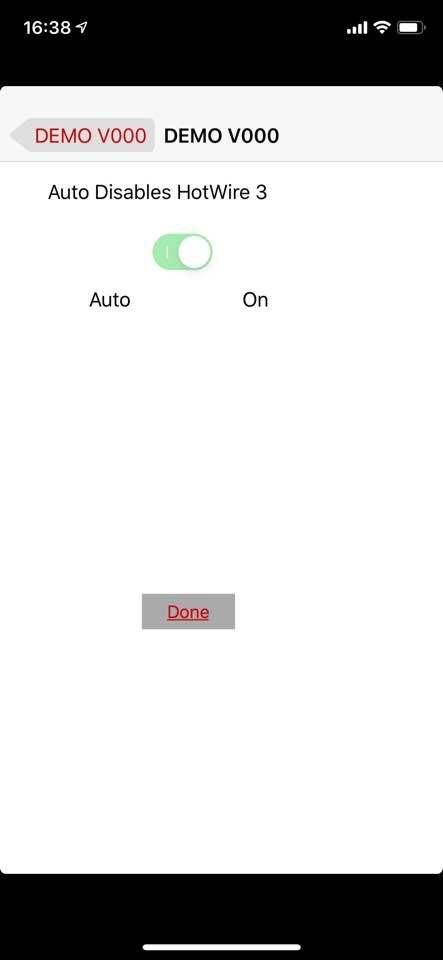
The Fan set up can't do nothing, just stuck to ON. not move to Auto from the switch.
I got this most reason why I wanna change the fan option to auto.
How can I activate this fan option switch??
And what is this mean "Auto Disables HotWires 3"??
11-20-2018 | 06:17 PM
#58
Tech Adept
Joined: Feb 2013
Posts: 179
According to previous posts in this thread the fan must be set to on for the Bluetooth to work. The fan port provides the power to the Bluetooth module so any setting other than on will inhibit the Bluetooth connection. I think the inability to select auto is a software failsafe.
11-21-2018 | 05:19 AM
#59
Tech Fanatic
iTrader: (3)
Joined: Nov 2004
Posts: 980
From: Spring Hill Tn
Also the picture you showed, your in Demo mode. Bind HW first and then you should be able to make any changes you'd like. Like sweems has mentioned the fan must be in the on position for the BTHW to function. I use it but I don't leave it on the vehicle and run it.