


 8Likes
Lap Timing Decoder
 03-13-2013 | 10:48 AM
#151
Tech Initiate
Joined: Dec 2012
Posts: 48

Here is an example of the data from the decoder, with a single transponder sitting in the loop:
B96CB700FFB6CE
CDFD4C00FFB6DA
CDFD4C00FFB6EA
CDFD4C00FFB6F9
CD8E2A00FFB706
CDFD4C00FFB70F
CDFD4C00FFB71A
CDFD4C00FFB728
749AA700FFB733
CDFD4C00FFB741
CDFD4C00FFB74D
CDFD4C00FFB75C
CABFB600FFB768
CDFD4C00FFB771
CDFD4C00FFB77B
CDFD4C00FFB785
73D37900FFB792
CDFD4C00FFB79A
CDFD4C00FFB7A4
CDFD4C00FFB7AE
0073D800FFB7BC
CDFD4C00FFB7C6
CDFD4C00FFB7D1
CDFD4C00FFB7E0
73D89700FFB7EF
CDFD4C00FFB7FA
CDFD4C00FFB80A
CDFD4C00FFB818
B96CB700FFB824
CDFD4C00FFB833
CDFD4C00FFB841
CDFD4C00FFB84C
CD8E2A00FFB85A
B96CB700FFB6CE
CDFD4C00FFB6DA
CDFD4C00FFB6EA
CDFD4C00FFB6F9
CD8E2A00FFB706
CDFD4C00FFB70F
CDFD4C00FFB71A
CDFD4C00FFB728
749AA700FFB733
CDFD4C00FFB741
CDFD4C00FFB74D
CDFD4C00FFB75C
CABFB600FFB768
CDFD4C00FFB771
CDFD4C00FFB77B
CDFD4C00FFB785
73D37900FFB792
CDFD4C00FFB79A
CDFD4C00FFB7A4
CDFD4C00FFB7AE
0073D800FFB7BC
CDFD4C00FFB7C6
CDFD4C00FFB7D1
CDFD4C00FFB7E0
73D89700FFB7EF
CDFD4C00FFB7FA
CDFD4C00FFB80A
CDFD4C00FFB818
B96CB700FFB824
CDFD4C00FFB833
CDFD4C00FFB841
CDFD4C00FFB84C
CD8E2A00FFB85A
p.s. We only have two transponder amb in our city.
 03-14-2013 | 01:15 AM
#152
Tech Rookie
Joined: Mar 2013
Posts: 8
well , the zround software with manual keys f1 f2 ...... is simple
you can implement this system with 12 transponders in a dismantalate keyboarb for that when passing transponder 1 automatic press f1 key , transponder 2 f2 key ........ to transponder 12 f12 key.
you can implement this system with 12 transponders in a dismantalate keyboarb for that when passing transponder 1 automatic press f1 key , transponder 2 f2 key ........ to transponder 12 f12 key.
03-17-2013 | 08:09 AM
#154
Tech Initiate
Joined: Dec 2012
Posts: 48
Today I tested my system. Its works fine, but there is some problems. Some times transponders are not detected. I think the problem is RESET pin not connected of ATTINY25. MCU just reseting all the time. I will add to protocol times of Poweed On to watch this. Some times i could conect to device by WiFi. But its works very fine.
Some photos


Some photos
03-18-2013 | 05:57 AM
#156


The Loop Amplifier and Phase Detector Input Amplifier have quite a bit of gain. If it needs to be decreased, it should be done by increasing R2 on the Phase Detector Input Amplifier. Doubling its value will cut the gain by about a factor of 2. If I need to add AGC to the system, this is where I will add the circuitry.
03-18-2013 | 05:59 AM
#157
Today I tested my system. Its works fine, but there is some problems. Some times transponders are not detected. I think the problem is RESET pin not connected of ATTINY25. MCU just reseting all the time. I will add to protocol times of Poweed On to watch this. Some times i could conect to device by WiFi. But its works very fine.
Some photos
Some photos
03-23-2013 | 07:06 AM
#158
I’ve been taking some time to get my cars ready for a couple of big races I’ll be attending, but now it’s time for an update on the decoder:
I went to Home Depot yesterday and bought some 1x2’s to make a timing loop “bridge” that I can use at the local track. (The track owner has kindly given me permission to set up the loop on a non-points day.) It will break down so the longest piece is 5’, so I can transport all of the pieces along with all of my cars and gear in my Miata. (The guys at the track find it amusing that the largest amount of RC stuff arrives in the smallest vehicle!) I’ll post photos when it is done.
Parts for my next try at the digital phase detector are on order. While the analog phase detector works nicely, I’d still like to use a digital arrangement that won’t need any tuning or “tweaking” for proper operation, since not everyone that will want to construct a decoder will have access to an oscilloscope.
I’ve also started software to move the first task that I had intended for the PC into the decoder: sorting the transponder messages, and only transmitting those that represent an ID to the PC. (This is the first step in calculating lap times inside the decoder, rather than in the PC.) This task would be much simpler if I knew the format of the transponder data and message! But since I don’t, I’ll use the method I previously mentioned: keeping a list of messages that have been received at least twice in a row, and sending only those messages.
Currently, there are two big “bottlenecks” in the decoder: the time it takes to send all transponder messages to the PC, and the large size of the transmit FIFO required to store all those messages while they are waiting to be sent. Calculating lap times for each car inside the decoder would be difficult, but it does have the advantage of eliminating the transmission time bottleneck, since only a single message would need to be sent per car per lap. I’m hoping that the RAM requirements for calculating lap times will be no larger than that for the FIFO.
I went to Home Depot yesterday and bought some 1x2’s to make a timing loop “bridge” that I can use at the local track. (The track owner has kindly given me permission to set up the loop on a non-points day.) It will break down so the longest piece is 5’, so I can transport all of the pieces along with all of my cars and gear in my Miata. (The guys at the track find it amusing that the largest amount of RC stuff arrives in the smallest vehicle!) I’ll post photos when it is done.
Parts for my next try at the digital phase detector are on order. While the analog phase detector works nicely, I’d still like to use a digital arrangement that won’t need any tuning or “tweaking” for proper operation, since not everyone that will want to construct a decoder will have access to an oscilloscope.
I’ve also started software to move the first task that I had intended for the PC into the decoder: sorting the transponder messages, and only transmitting those that represent an ID to the PC. (This is the first step in calculating lap times inside the decoder, rather than in the PC.) This task would be much simpler if I knew the format of the transponder data and message! But since I don’t, I’ll use the method I previously mentioned: keeping a list of messages that have been received at least twice in a row, and sending only those messages.
Currently, there are two big “bottlenecks” in the decoder: the time it takes to send all transponder messages to the PC, and the large size of the transmit FIFO required to store all those messages while they are waiting to be sent. Calculating lap times for each car inside the decoder would be difficult, but it does have the advantage of eliminating the transmission time bottleneck, since only a single message would need to be sent per car per lap. I’m hoping that the RAM requirements for calculating lap times will be no larger than that for the FIFO.
03-27-2013 | 04:47 AM
#159
The Personal Lap Timer in Action!
Here are some photos from testing the decoder. I was using the Personal Lap Timer software.
I had to re-tune the loop amplifier to match the new timing loop, since I eliminated the 3’ lead-in length of zip cord used on the original loop. There is now virtually no lead-in length since the loop amplifier is placed directly at the loop.
The photo of the lap times shows 10 laps in a row (at the bottom of the screen) where I drove my 1/10 scale, 13.5T 1s pan car under the loop under full acceleration from a standing start about 3’ away, then turned around and did the same in the other direction. These conditions create a large amount of electrical noise from the motor and ESC, as the current draw is highest. There were no problems with the pan car.
I then tried my 17.5T, 2s TC, using the original AMB transponder, and missed about half of the laps. This seemed to be regardless of whether I was on throttle through the loop, or coasting through it. The problem turned out to be insufficient pulse stretching time in the analog phase detector, which I have now corrected.


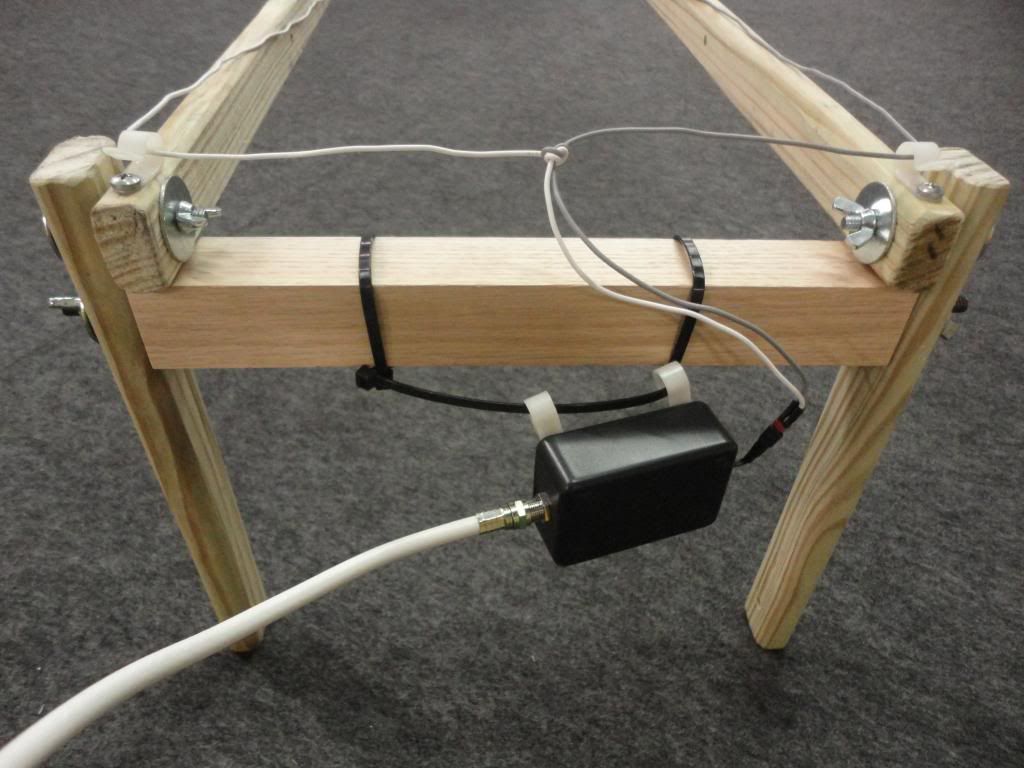


I had to re-tune the loop amplifier to match the new timing loop, since I eliminated the 3’ lead-in length of zip cord used on the original loop. There is now virtually no lead-in length since the loop amplifier is placed directly at the loop.
The photo of the lap times shows 10 laps in a row (at the bottom of the screen) where I drove my 1/10 scale, 13.5T 1s pan car under the loop under full acceleration from a standing start about 3’ away, then turned around and did the same in the other direction. These conditions create a large amount of electrical noise from the motor and ESC, as the current draw is highest. There were no problems with the pan car.
I then tried my 17.5T, 2s TC, using the original AMB transponder, and missed about half of the laps. This seemed to be regardless of whether I was on throttle through the loop, or coasting through it. The problem turned out to be insufficient pulse stretching time in the analog phase detector, which I have now corrected.
Last edited by howardcano; 03-27-2013 at 06:11 AM.


 03-30-2013 | 05:52 AM
#163
The software for separating transponder ID messages from status messages, and sending only the ID messages to the PC, is operational. Despite being quite complex, the software functioned on the first try. (This only partially compensates for me spending days to fix ridiculously trivial items on other parts of the software!)
The first photo shows 10 transponders (5 Cano, 4 AMB, and 1 MRT) gathered around a small testing loop. This is a worst-case scenario, and in fact I wasn’t counting on the software being able to determine which messages are for ID and save them to the list in RAM in this situation (since a message must be received twice in a row to be saved as an ID message). While it does take a few seconds for all the IDs to be determined and saved, it eventually happens. This is a pleasant surprise, but has no bearing on operation on the track, where each ID would be determined as each car passes individually through the loop during the race warmup.
At the moment the newest 11 verified ID messages are saved in RAM, so the decoder has a limit of 10 cars on the track at the same time if we reserve one ID for a safety margin. This number is a bit arbitrary; there is more RAM available, but each verified ID adds to the microprocessor workload.
The second photo shows the decoder output sent to the PC. All 10 transponder IDs are present (represented by the first 6 characters on each line), with no bogus messages, and none of the 70 different status messages (7 for each transponder).
Eliminating the status messages actually mitigates one of the bottlenecks in the system by reducing the data sent to the PC (by 25%, since each transponder sends a status message every fourth transmission). The tradeoff is that the microprocessor workload is increased.
The next step will be for the decoder to determine the crossing time for each transponder, and only send that information to the PC. This will virtually eliminate the bottleneck of sending data to the PC, since the data would need to be sent only once per car per lap. It remains to be seen if the little PIC can be coaxed into doing this much work!


The first photo shows 10 transponders (5 Cano, 4 AMB, and 1 MRT) gathered around a small testing loop. This is a worst-case scenario, and in fact I wasn’t counting on the software being able to determine which messages are for ID and save them to the list in RAM in this situation (since a message must be received twice in a row to be saved as an ID message). While it does take a few seconds for all the IDs to be determined and saved, it eventually happens. This is a pleasant surprise, but has no bearing on operation on the track, where each ID would be determined as each car passes individually through the loop during the race warmup.
At the moment the newest 11 verified ID messages are saved in RAM, so the decoder has a limit of 10 cars on the track at the same time if we reserve one ID for a safety margin. This number is a bit arbitrary; there is more RAM available, but each verified ID adds to the microprocessor workload.
The second photo shows the decoder output sent to the PC. All 10 transponder IDs are present (represented by the first 6 characters on each line), with no bogus messages, and none of the 70 different status messages (7 for each transponder).
Eliminating the status messages actually mitigates one of the bottlenecks in the system by reducing the data sent to the PC (by 25%, since each transponder sends a status message every fourth transmission). The tradeoff is that the microprocessor workload is increased.
The next step will be for the decoder to determine the crossing time for each transponder, and only send that information to the PC. This will virtually eliminate the bottleneck of sending data to the PC, since the data would need to be sent only once per car per lap. It remains to be seen if the little PIC can be coaxed into doing this much work!
Last edited by howardcano; 03-30-2013 at 06:06 AM.
03-30-2013 | 07:57 AM
#164
Option for Decoder
Howard,
I know you will laugh when reading this, but you know how I like to over analize things like data ...... hummmmmmm just like you ......
Is there a way to have more than one loop to transmit the data? Think F-1 and have times in each segment and then a total.
Lastly, option to just track ONE transponder. Think of this as your own track timing, but what a wonderful tool. You could time the sweeper and straight, plus one or two spots in the infield. Make some changes, like a gear change for the nitro car and see what it does in each section, what your giving up to get something else.
Just a thought
Mark
I know you will laugh when reading this, but you know how I like to over analize things like data ...... hummmmmmm just like you ......
Is there a way to have more than one loop to transmit the data? Think F-1 and have times in each segment and then a total.
Lastly, option to just track ONE transponder. Think of this as your own track timing, but what a wonderful tool. You could time the sweeper and straight, plus one or two spots in the infield. Make some changes, like a gear change for the nitro car and see what it does in each section, what your giving up to get something else.
Just a thought
Mark
03-30-2013 | 10:13 AM
#165
The scoring software would need the ability to monitor more than one decoder and combine the results. I believe Alycat already has this capability. Of course, the scoring software must also accept input from my decoder! I still need to deal with that in some manner.
Lastly, option to just track ONE transponder. Think of this as your own track timing, but what a wonderful tool. You could time the sweeper and straight, plus one or two spots in the infield. Make some changes, like a gear change for the nitro car and see what it does in each section, what your giving up to get something else.
It shouldn't be difficult to combine the outputs of two loop amplifiers to permit splits with a single decoder. But there would be no way for the decoder to know which signal was coming from where, so you would need to use split times that were obviously different from each other so you could see which was which.
In both of these cases, there is of course the inconvenience of setting up one or more of your own timing loops.
Last edited by howardcano; 03-30-2013 at 04:56 PM.