


 700Likes
FlySky Noble NB4
 04-22-2024 | 03:40 PM
#1636

Tech Apprentice
Joined: Jan 2020
Posts: 95
From: Huntsville, AL

ie, -100% (full brake), meaning that the countdown timer starts immediately, regardless of throttle position, no start button needed. Functionally, just what I was looking for! Thank you!
 04-25-2024 | 10:42 AM
#1637
Tech Addict
iTrader: (2)
Joined: Jan 2019
Posts: 669
From: Las Vegas
I finally got the blue cage/frame (see my revenge posts) installed on the NB4+.
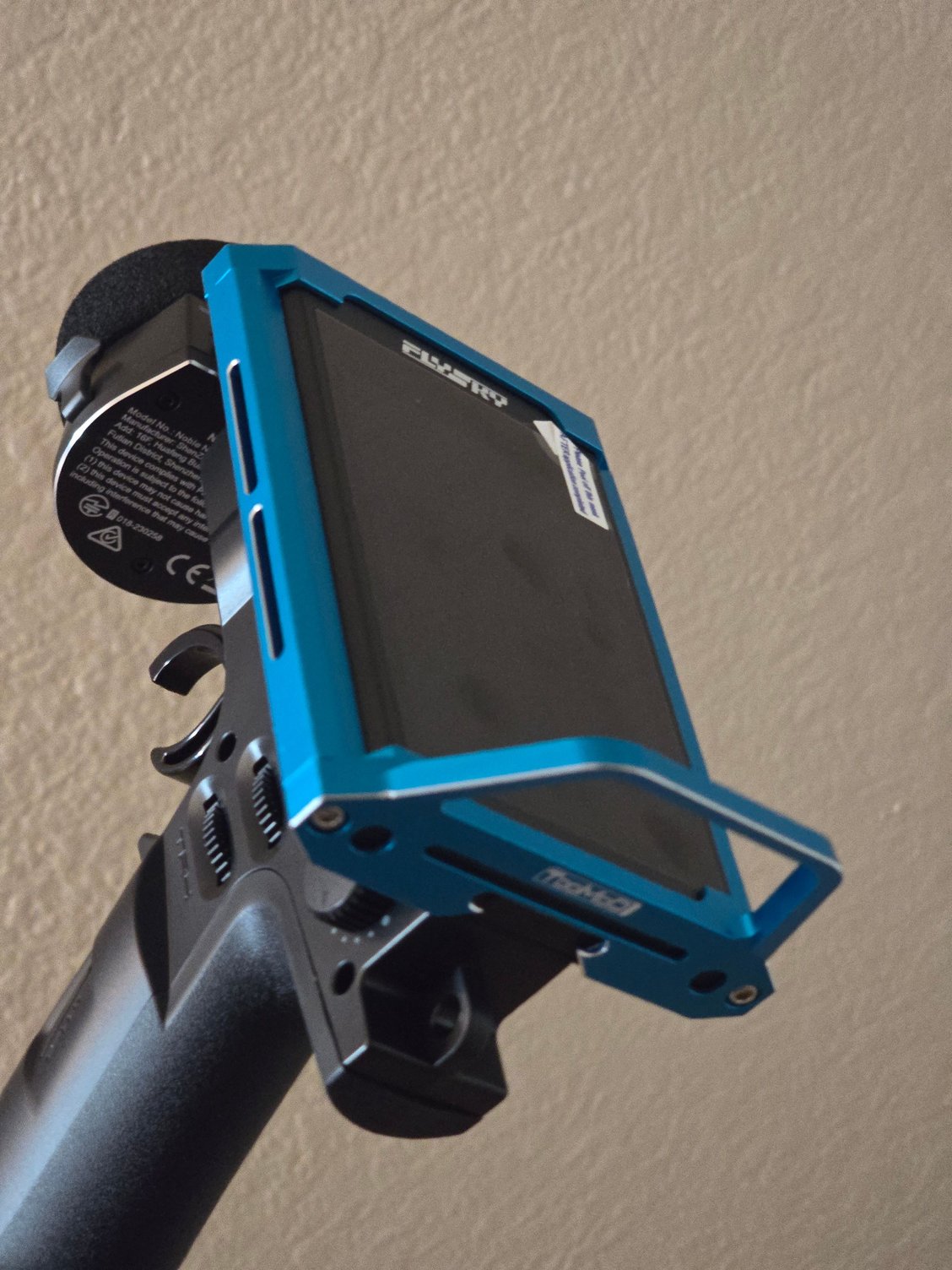

I can't speak for anyone else...but, at least to me, the blue looks MUCH better than the usual four color options (black, red, gold, & purple) that are available from all the other sellers.
That being said, I did discover something 'interesting' when installing it. For those who've already purchased/installed these on their Noble radios, you probably already understand. Some of the sellers install thin neoprene/rubber pads on the insides of the pieces, and others don't (I'm guessing the OEMs don't install them at their factories). For anyone having received a cage/frame without the pads (as mine came), when you go to install it, you'll quickly discover the cage/frame "moves" up/down/left/right/forward/backward, as there is approximately 1.5mm of play in all directions...thus, the very reason some sellers install the pads. If you install thin neoprene/rubber pads to the inside face of all four pieces, this will fix the problem.
I forgot to take photos...but, what I used was the thin (0.98mm w/ both sides of the adhesive cover paper still in place) "electronics mounting" strips that come with many RC kits. I cut multiple pieces (2 for each side piece, 4 (2 side, top, & bottom) for the front piece, and 4 (2 'upper' & 2 'lower') for the rear piece), peeled off one side of the paper, and stuck them in the 'appropriate' places on each piece. In installing the cage/frame on the radio display housing, the pads compress just slightly...enough that they provide just a minor amount of "resistance" to the 4 screws, which will help prevent the screws from backing out (ie. you won't need to use threadlock on the screws). I purposely didn't peel the paper off the other side of the pads, to make removing the cage/frame easier...but, if you want to make 100% certain it doesn't move, you can always peel off the paper, which will adhere the pieces to the display housing.
I can't speak for anyone else...but, at least to me, the blue looks MUCH better than the usual four color options (black, red, gold, & purple) that are available from all the other sellers.
That being said, I did discover something 'interesting' when installing it. For those who've already purchased/installed these on their Noble radios, you probably already understand. Some of the sellers install thin neoprene/rubber pads on the insides of the pieces, and others don't (I'm guessing the OEMs don't install them at their factories). For anyone having received a cage/frame without the pads (as mine came), when you go to install it, you'll quickly discover the cage/frame "moves" up/down/left/right/forward/backward, as there is approximately 1.5mm of play in all directions...thus, the very reason some sellers install the pads. If you install thin neoprene/rubber pads to the inside face of all four pieces, this will fix the problem.
I forgot to take photos...but, what I used was the thin (0.98mm w/ both sides of the adhesive cover paper still in place) "electronics mounting" strips that come with many RC kits. I cut multiple pieces (2 for each side piece, 4 (2 side, top, & bottom) for the front piece, and 4 (2 'upper' & 2 'lower') for the rear piece), peeled off one side of the paper, and stuck them in the 'appropriate' places on each piece. In installing the cage/frame on the radio display housing, the pads compress just slightly...enough that they provide just a minor amount of "resistance" to the 4 screws, which will help prevent the screws from backing out (ie. you won't need to use threadlock on the screws). I purposely didn't peel the paper off the other side of the pads, to make removing the cage/frame easier...but, if you want to make 100% certain it doesn't move, you can always peel off the paper, which will adhere the pieces to the display housing.
04-30-2024 | 11:02 PM
#1638

Looking to replace my radio with a NB4+. Can you adjust HobbyWing ESC settings via the radio? For instance if you want to change the ESC turbo setting or drag brake. Does the NB4+ have the capability to do that from the drivers stand? Not talking about endpoints. But actually changing the ESC programming from the radio.
04-30-2024 | 11:19 PM
#1639

Tech Lord

Joined: Aug 2007
Posts: 14,052
From: Holland
Looking to replace my radio with a NB4+. Can you adjust HobbyWing ESC settings via the radio? For instance if you want to change the ESC turbo setting or drag brake. Does the NB4+ have the capability to do that from the drivers stand? Not talking about endpoints. But actually changing the ESC programming from the radio.
04-30-2024 | 11:25 PM
#1640
Not that I am aware of. I was told that new flysky had the capability to do that. I wasn’t able to find any confirmation. Being everything is going to Bluetooth, I could see how it could possibly happen. Just wasn’t aware of that technology available as of yet.
04-30-2024 | 11:29 PM
#1641
Tech Addict
iTrader: (2)
Joined: Jan 2019
Posts: 669
From: Las Vegas
Looking to replace my radio with a NB4+. Can you adjust HobbyWing ESC settings via the radio? For instance if you want to change the ESC turbo setting or drag brake. Does the NB4+ have the capability to do that from the drivers stand? Not talking about endpoints. But actually changing the ESC programming from the radio.
05-01-2024 | 03:35 AM
#1643
Joined: Aug 2001
Posts: 4,385
From: NW Indiana
Looking to replace my radio with a NB4+. Can you adjust HobbyWing ESC settings via the radio? For instance if you want to change the ESC turbo setting or drag brake. Does the NB4+ have the capability to do that from the drivers stand? Not talking about endpoints. But actually changing the ESC programming from the radio.
Yes, but only with a certain Hobbywing ESC
 05-01-2024 | 07:24 AM
#1644
Tech Addict
iTrader: (2)
Joined: Jan 2019
Posts: 669
From: Las Vegas
Well, I'll be...call me impressed. I'm not the one who asked...but, definitely, thank you for that info (I haven't gotten around to reading the NB4+ manual). Tho, I see why, as that one specific ESC is classified as an i-BUS2 device (probably a chip on the circuit board). The 'down side is, it's a crawler-specific ESC.
05-01-2024 | 07:32 AM
#1645
Joined: Dec 2004
Posts: 2,856
From: Marietta, Ga
05-01-2024 | 10:42 AM
#1646
Ok…so the person that told me the flysky would adjust the ESC settings wasn’t wrong. However it appears only to work with a crawler ESC. After he told me it would change the settings, I was wondering if that is why some top guys were suddenly changing brands.
05-17-2024 | 01:20 AM
#1647

Tech Apprentice
Joined: May 2022
Posts: 64
From: OC, CA
Got the base battery pack from this link: https://skyvault.shop/collections/nb...from-march-1st
New one is USB-C (thank gawd, micro usb is such trash) and it snapped right on and everything is peachy.
Just a note for anyone that might need to buy that replacement battery....shipping took about 5 weeks for it to get here in the US.
New one is USB-C (thank gawd, micro usb is such trash) and it snapped right on and everything is peachy.
Just a note for anyone that might need to buy that replacement battery....shipping took about 5 weeks for it to get here in the US.
05-17-2024 | 07:55 AM
#1648
Tech Apprentice
iTrader: (1)
Joined: Feb 2024
Posts: 57
From: SoCal
Got the base battery pack from this link: https://skyvault.shop/collections/nb...from-march-1st
New one is USB-C (thank gawd, micro usb is such trash) and it snapped right on and everything is peachy.
Just a note for anyone that might need to buy that replacement battery....shipping took about 5 weeks for it to get here in the US.
New one is USB-C (thank gawd, micro usb is such trash) and it snapped right on and everything is peachy.
Just a note for anyone that might need to buy that replacement battery....shipping took about 5 weeks for it to get here in the US.
05-19-2024 | 09:40 AM
#1649
Tech Addict
iTrader: (2)
Joined: Jan 2019
Posts: 669
From: Las Vegas
As 'nice' as the Pro is over the MB4/NB4+, the price difference does not make it worth it. Everyone knows the Pro includes extra accessories...but, the case & wireless charging (the only "real" difference) is NOT worth paying twice the price. Also, just in case you're not aware, in addition to wireless charging being slower than plug-in charging, wireless charging also shortens the overall life of the battery being charged (unless from within that device's settings, you have the ability to "slow down" the wireless charging, such as may Android phones can do). Next time you wirelessly charge a device, feel it from the back, and you'll notice how 'warm' it is. Then, the next time you charge that same device by plugging it in, feel it from the back, and you'll notice it's considerably cooler. That heat from charging wirelessly is what plays into shortening that device's overall battery life.
05-19-2024 | 06:03 PM
#1650
Tech Apprentice
iTrader: (1)
Joined: Feb 2024
Posts: 57
From: SoCal
As 'nice' as the Pro is over the MB4/NB4+, the price difference does not make it worth it. Everyone knows the Pro includes extra accessories...but, the case & wireless charging (the only "real" difference) is NOT worth paying twice the price. Also, just in case you're not aware, in addition to wireless charging being slower than plug-in charging, wireless charging also shortens the overall life of the battery being charged (unless from within that device's settings, you have the ability to "slow down" the wireless charging, such as may Android phones can do). Next time you wirelessly charge a device, feel it from the back, and you'll notice how 'warm' it is. Then, the next time you charge that same device by plugging it in, feel it from the back, and you'll notice it's considerably cooler. That heat from charging wirelessly is what plays into shortening that device's overall battery life.