


 57Likes
The Speed Passion Thread
 04-14-2013 | 01:42 AM


Normally I'm a really loyal customer of SP, have loved their products, I just picked up the Reventon Pro and the wifi module and have had the worst luck. The slot where the sensor cable goes in, one of the prongs is half missing, secondly, I can't get the wifi to work worth a darn. I can't get it to stay connected or anything, I'm really baffled ;\
 04-14-2013 | 07:21 AM


http://www.speedpassion.net/en/download.asp
As I stated a few replies above yours, I am running the program on a Mac, but not natively.
I am running the current version of OSX and installed an old version of XP SP3 that I've had lying around.
If you aren't really computer savvy, I would skip the XP install and install Windows 7 via Bootcamp as it will be much easier.
Installing the Speed Passion program itself is pretty simple, unzip the program, install the USB driver, locate the driver in com ports and double click or right click? to assign it properly and complete the driver installation.
After that, install the PC program, connect your ESC, and the rest is simple.
04-14-2013 | 10:48 AM

Tech Regular
Joined: Feb 2011
Posts: 401
From: planet X in a distant galaxy
Normally I'm a really loyal customer of SP, have loved their products, I just picked up the Reventon Pro and the wifi module and have had the worst luck. The slot where the sensor cable goes in, one of the prongs is half missing, secondly, I can't get the wifi to work worth a darn. I can't get it to stay connected or anything, I'm really baffled ;\
I just don't think the technology is perfected yet, and we the end purchasers are being used as testers at our own expense.
I have not seen any of the the known SP Reps on this board respond to questions about failed Bluetooth and Wifi Modules, makes me wonder about the integrity of the company.
04-14-2013 | 11:09 AM
You are not alone, I was able to get the WiFi module I purchased to work 3 times and it failed. I have sent it back hoping for a replacement.
I just don't think the technology is perfected yet, and we the end purchasers are being used as testers at our own expense.
I have not seen any of the the known SP Reps on this board respond to questions about failed Bluetooth and Wifi Modules, makes me wonder about the integrity of the company.
I just don't think the technology is perfected yet, and we the end purchasers are being used as testers at our own expense.
I have not seen any of the the known SP Reps on this board respond to questions about failed Bluetooth and Wifi Modules, makes me wonder about the integrity of the company.
04-14-2013 | 01:01 PM

Where is the "turbo" feature in the Reventon Pro settings?
I understand that there's timing and punch already, but I'm looking for a Tekin-type "turbo" setting to kick up the top speed for straights.
Am I missing it or does the Reventon Pro not have it?
I understand that there's timing and punch already, but I'm looking for a Tekin-type "turbo" setting to kick up the top speed for straights.
Am I missing it or does the Reventon Pro not have it?
04-14-2013 | 01:31 PM
However it came out of the box is what I have on my esc right now. I downloaded the newest PC software but did not see any type of "turbo" in the user manual and so I have not installed the newest software on the LCD box or on my reventon pro yet.
Is there a specific profile that has a turbo feature that maybe is not listed in the instruction manual?
Is there a specific profile that has a turbo feature that maybe is not listed in the instruction manual?
04-14-2013 | 01:41 PM
However it came out of the box is what I have on my esc right now. I downloaded the newest PC software but did not see any type of "turbo" in the user manual and so I have not installed the newest software on the LCD box or on my reventon pro yet.
Is there a specific profile that has a turbo feature that maybe is not listed in the instruction manual?
Is there a specific profile that has a turbo feature that maybe is not listed in the instruction manual?
You will need to load a profile that allows dynamic timing (Not blinky).
Were you able to properly install the USB driver?
04-14-2013 | 02:29 PM
've been able to successfully load the PC program and my Parallels XP system sees the reventon LCD box as the "CP2102 USB to UART BRIDGE CONTROLLER" but the PC program does not seem to recognize it.
Within the PC folder I do see the "SPusbdriver 6.6" folder. I think I have installed that correctly because now if I click on the setup icon in that folder, it says that the driver is already installed. However, if I unplug and then plug in the LCD box, it get a "new hardware"wizard that pops up.
I'm not sure about this "com ports assignment" you mentioned. Maybe that's what I'm missing.
---
edit: found the device manager and located the reventon box and the device properties says that the device is not configured correctly. So, maybe the USB driver was not installed correctly. So, now I don't know where to go.
04-14-2013 | 02:39 PM
I'm running windows XP on a mac using Parallels.
've been able to successfully load the PC program and my Parallels XP system sees the reventon LCD box as the "CP2102 USB to UART BRIDGE CONTROLLER" but the PC program does not seem to recognize it.
Within the PC folder I do see the "SPusbdriver 6.6" folder. I think I have installed that correctly because now if I click on the setup icon in that folder, it says that the driver is already installed. However, if I unplug and then plug in the LCD box, it get a "new hardware"wizard that pops up.
I'm not sure about this "com ports assignment" you mentioned. Maybe that's what I'm missing.
've been able to successfully load the PC program and my Parallels XP system sees the reventon LCD box as the "CP2102 USB to UART BRIDGE CONTROLLER" but the PC program does not seem to recognize it.
Within the PC folder I do see the "SPusbdriver 6.6" folder. I think I have installed that correctly because now if I click on the setup icon in that folder, it says that the driver is already installed. However, if I unplug and then plug in the LCD box, it get a "new hardware"wizard that pops up.
I'm not sure about this "com ports assignment" you mentioned. Maybe that's what I'm missing.
Do you know how to get to the com ports?
Just go to Start/My Computer/View System Information/Hardware/Device Manager/Ports and then double click the port that says Speed Passion. After this, click driver and update driver... I'll update the rest in a sec. I need to check again for myself.
04-14-2013 | 02:53 PM
Sorry to other forum members for this back-and-forth, but maybe someone else can learn from this, too.
I can get to the Device Manager. I don't see "Speed Passion", but do see a 'bridge controller' which is the LCD box. If I click on that and then click on 'install driver' the system looks for software but can't find it anywhere.
Notice that the port dialog box for the controller says that it's not configured correctly. Not sure why that's happening.

I can get to the Device Manager. I don't see "Speed Passion", but do see a 'bridge controller' which is the LCD box. If I click on that and then click on 'install driver' the system looks for software but can't find it anywhere.
Notice that the port dialog box for the controller says that it's not configured correctly. Not sure why that's happening.
 04-14-2013 | 02:54 PM
^^^
Yeah, I am trying to help you and others with this issue.
You need to click "No, not this time," and then "Install from a list or specific location (Advanced)"
Next, browse your C drive under Program Files and find the Speed Passion USB Installer program and click next.
You will then see a Hardware Installation Caution where you will click "Continue Anyway"
After this, click "Finish" and you are done.
I will update screen shots momentarily.
Yeah, I am trying to help you and others with this issue.
You need to click "No, not this time," and then "Install from a list or specific location (Advanced)"
Next, browse your C drive under Program Files and find the Speed Passion USB Installer program and click next.
You will then see a Hardware Installation Caution where you will click "Continue Anyway"
After this, click "Finish" and you are done.
I will update screen shots momentarily.
04-14-2013 | 03:27 PM
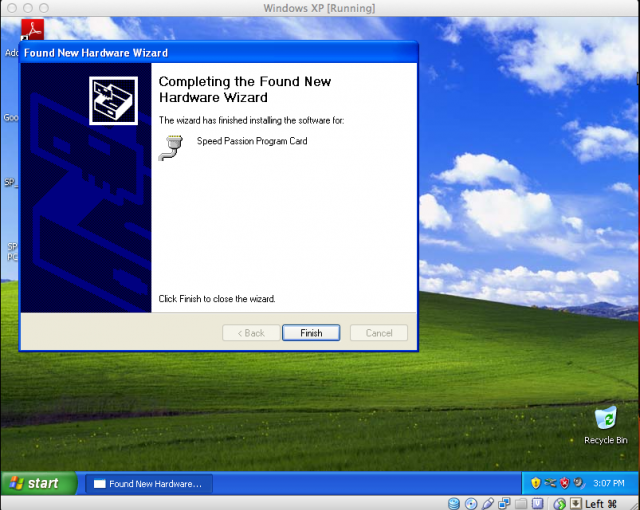
After you plug in your new USB device (Speed Passion program card), you may see the following: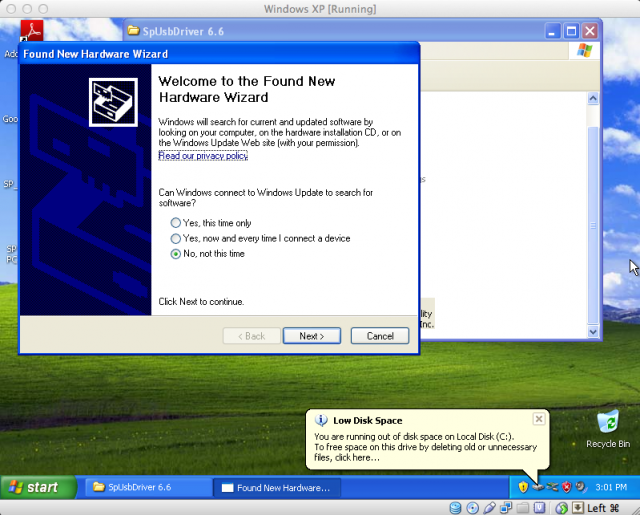
After you click no and proceed, you will see:
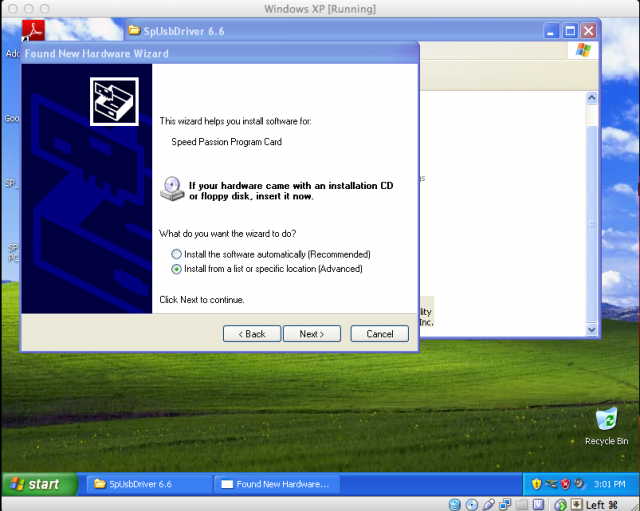
Click install from specified location and proceed
Here, you will find the location of your SP USB driver. If you have not already attempted to install it, you may see it on your desktop. If you have attempted to install it already, you can find it in Program Files
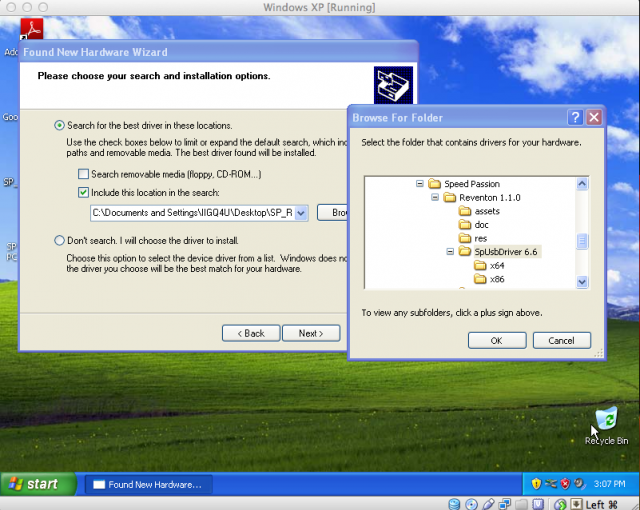
After you have found the location of the SP USB installer, you will see the following:
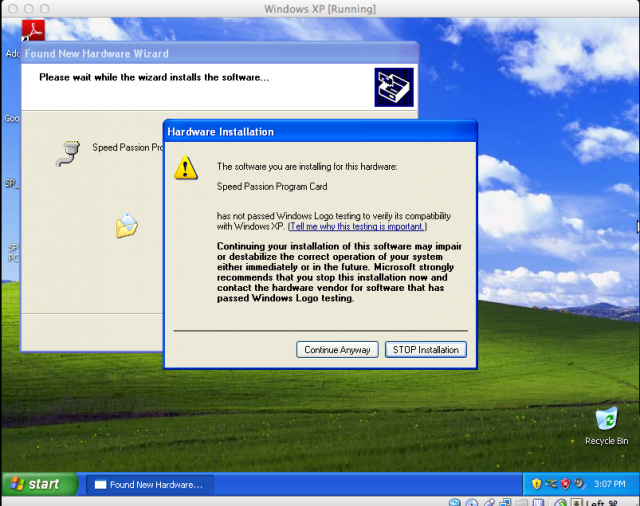
Click "Continue Anyway"
Now click "Finished"
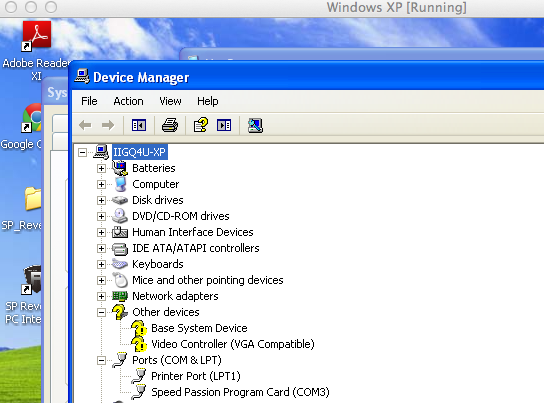
To verify the installation, go to your Device Manager and expand the ports column. When properly installed, you will see the following:
After this, fire up your Reventon ESC program, plug your ESC 3 port lead into the 3 port slot on the programming card and insert the USB into the computer:
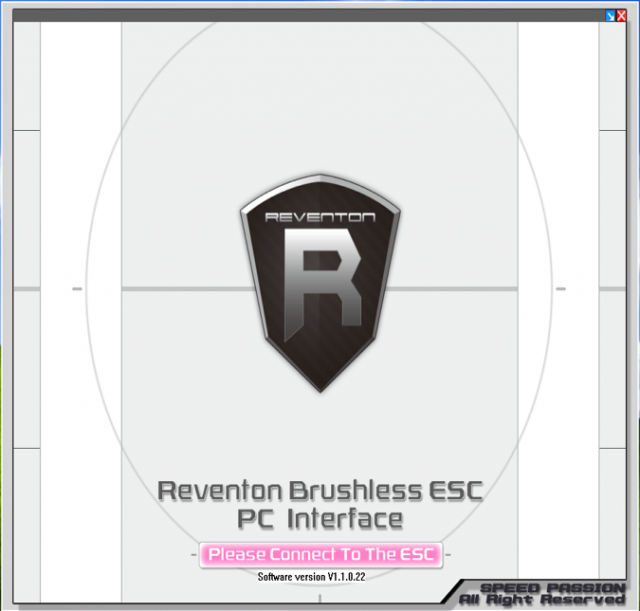
Once this is all done, you will see something similar to this:
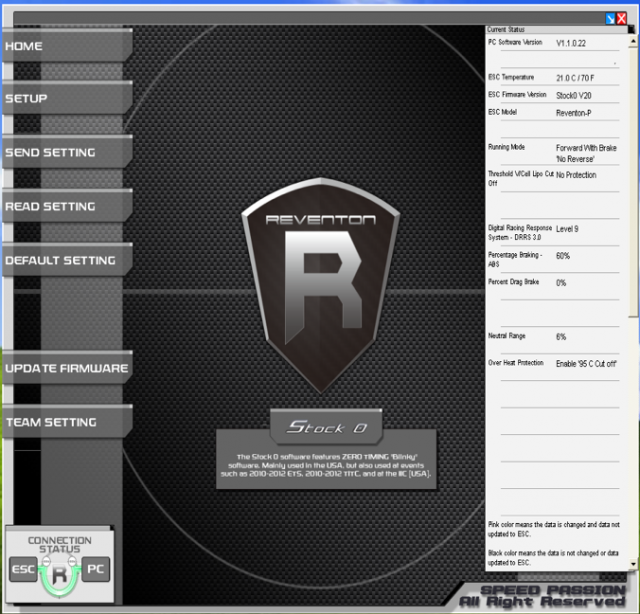
From here, you are on your own.
After you click no and proceed, you will see:
Click install from specified location and proceed
Here, you will find the location of your SP USB driver. If you have not already attempted to install it, you may see it on your desktop. If you have attempted to install it already, you can find it in Program Files
After you have found the location of the SP USB installer, you will see the following:
Click "Continue Anyway"
Now click "Finished"
To verify the installation, go to your Device Manager and expand the ports column. When properly installed, you will see the following:
After this, fire up your Reventon ESC program, plug your ESC 3 port lead into the 3 port slot on the programming card and insert the USB into the computer:
Once this is all done, you will see something similar to this:
From here, you are on your own.
Last edited by IIGQ4U; 04-14-2013 at 03:44 PM.
04-14-2013 | 04:19 PM
Thank you very much for all your help.
I keep getting an error though. I think maybe part of the problem is that my computer does not recognize the LCD box as Speed Passsion. It just sees it as "CP2102 USB to UART BRIDGE CONTROLLER" and it shows up under "other devices" in the hardware manager, not the "ports".
I can get through all the steps you provide but when I locate the USB folder and try to install, it just ends up saying that I cannot install the hardware because the wizard cannot find the necessary software.
I told it exactly where to look though, so I'm not sure the problem here.
I am using the box that came with the Reventon Pro. It says it's the "Smart LCD Program Card". Do I need a different box?
I keep getting an error though. I think maybe part of the problem is that my computer does not recognize the LCD box as Speed Passsion. It just sees it as "CP2102 USB to UART BRIDGE CONTROLLER" and it shows up under "other devices" in the hardware manager, not the "ports".
I can get through all the steps you provide but when I locate the USB folder and try to install, it just ends up saying that I cannot install the hardware because the wizard cannot find the necessary software.
I told it exactly where to look though, so I'm not sure the problem here.
I am using the box that came with the Reventon Pro. It says it's the "Smart LCD Program Card". Do I need a different box?
04-14-2013 | 04:22 PM

I am running the reventon pro with LRP x12 10.5 in blinky mode. I am running the v20 software. The problem I have is that when the car runs the power seems way down. The voltage in the battery is fine. I ran the motor with my HW justsock and the motor runs fine, so that not the problem. I have tried the esc with a17.5 Tekin and it does the same thing. Any suggestions would be appreciated.