


dx3.0 binding button absent
 12-31-2010 | 05:46 AM
#1

Thread Starter
Tech Adept
Joined: Sep 2007
Posts: 127
 dx3.0 binding button absent
hi
i've got a weird problem. i bought a micro crawler from amain and i can't bind the spektrum dx3.0 transmitter. manual says to hit the bind button on the back of the tx. thing is there's no bind button . anybody in the same situation?
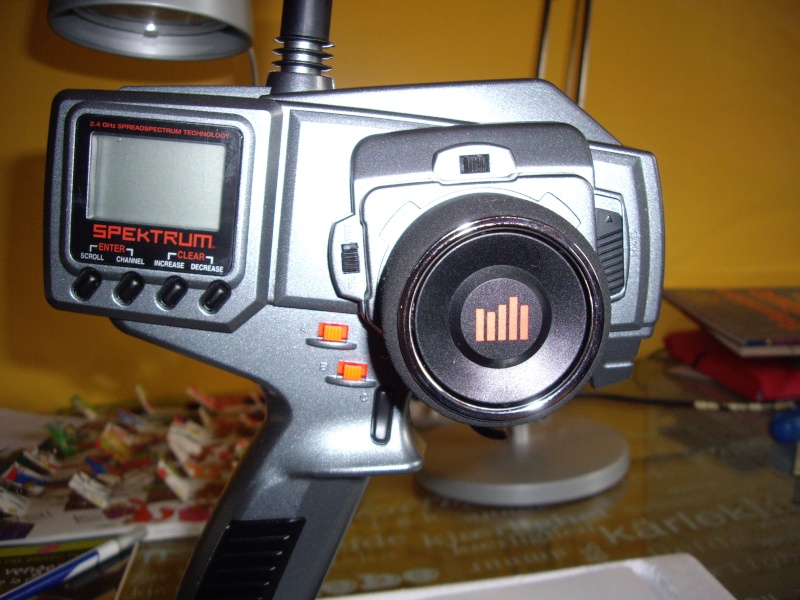

i've got a weird problem. i bought a micro crawler from amain and i can't bind the spektrum dx3.0 transmitter. manual says to hit the bind button on the back of the tx. thing is there's no bind button
. anybody in the same situation?
 12-31-2010 | 07:06 AM
#2

Is there a bind button under the sticker? Maybe it's recessed? Just checked the manual and it should be there.
Only other thing I can think of is if they just changed it to auto-bind on startup. My spare Losi 2.4GHz (Spektrum also) TX is like this, you just put the RX in bind mode, turn on the TX, and it automatically looks for an RX to bind at startup each time.
Only other thing I can think of is if they just changed it to auto-bind on startup. My spare Losi 2.4GHz (Spektrum also) TX is like this, you just put the RX in bind mode, turn on the TX, and it automatically looks for an RX to bind at startup each time.
12-31-2010 | 07:22 AM
#3
Tech Adept
Joined: Jan 2008
Posts: 118
From: St.Petersburg, Russia
Read the manual SPM20320.
http://www.spektrumrc.com/ProdInfo/F...l_SPM20320.pdf
To bind the receiver to the transmitter
1. Make sure the transmitter and receiver are turned off.
2. With the receiver off, insert the bind plug into the BIND port on the receiver.
3. Power the receiver through any port. The green LED will flash continuously, indicating the receiver is in bind mode.
4. Hold down on the SCROLL and CHANNEL buttons while turning on the transmitter.
To enter System Mode, press the SCROLL button until “BND” appears on the screen.
5. With the steering wheel and the throttle trigger in their desired failsafe positions, press the INCREASE and DECREASE buttons at the same time to enter bind mode. “BND” will flash when in bind mode.
6. After several seconds the LED on the receiver will quit flashing and remain solid, indicating that the binding process was successful. Once binding is complete, the system will automatically connect.
7. Once the bind process is complete and before power is cycled on the receiver, remove the bind plug from the receiver and store it in a convenient place. Failure to remove the bind plug will result in the receiver going back into bind mode.
http://www.spektrumrc.com/ProdInfo/F...l_SPM20320.pdf
To bind the receiver to the transmitter
1. Make sure the transmitter and receiver are turned off.
2. With the receiver off, insert the bind plug into the BIND port on the receiver.
3. Power the receiver through any port. The green LED will flash continuously, indicating the receiver is in bind mode.
4. Hold down on the SCROLL and CHANNEL buttons while turning on the transmitter.
To enter System Mode, press the SCROLL button until “BND” appears on the screen.
5. With the steering wheel and the throttle trigger in their desired failsafe positions, press the INCREASE and DECREASE buttons at the same time to enter bind mode. “BND” will flash when in bind mode.
6. After several seconds the LED on the receiver will quit flashing and remain solid, indicating that the binding process was successful. Once binding is complete, the system will automatically connect.
7. Once the bind process is complete and before power is cycled on the receiver, remove the bind plug from the receiver and store it in a convenient place. Failure to remove the bind plug will result in the receiver going back into bind mode.
 01-04-2011 | 09:55 PM
#6
Tech Master
iTrader: (19)
Joined: Nov 2010
Posts: 1,020
Read the manual SPM20320.
http://www.spektrumrc.com/ProdInfo/F...l_SPM20320.pdf
To bind the receiver to the transmitter
1. Make sure the transmitter and receiver are turned off.
2. With the receiver off, insert the bind plug into the BIND port on the receiver.
3. Power the receiver through any port. The green LED will flash continuously, indicating the receiver is in bind mode.
4. Hold down on the SCROLL and CHANNEL buttons while turning on the transmitter.
To enter System Mode, press the SCROLL button until “BND” appears on the screen.
5. With the steering wheel and the throttle trigger in their desired failsafe positions, press the INCREASE and DECREASE buttons at the same time to enter bind mode. “BND” will flash when in bind mode.
6. After several seconds the LED on the receiver will quit flashing and remain solid, indicating that the binding process was successful. Once binding is complete, the system will automatically connect.
7. Once the bind process is complete and before power is cycled on the receiver, remove the bind plug from the receiver and store it in a convenient place. Failure to remove the bind plug will result in the receiver going back into bind mode.
http://www.spektrumrc.com/ProdInfo/F...l_SPM20320.pdf
To bind the receiver to the transmitter
1. Make sure the transmitter and receiver are turned off.
2. With the receiver off, insert the bind plug into the BIND port on the receiver.
3. Power the receiver through any port. The green LED will flash continuously, indicating the receiver is in bind mode.
4. Hold down on the SCROLL and CHANNEL buttons while turning on the transmitter.
To enter System Mode, press the SCROLL button until “BND” appears on the screen.
5. With the steering wheel and the throttle trigger in their desired failsafe positions, press the INCREASE and DECREASE buttons at the same time to enter bind mode. “BND” will flash when in bind mode.
6. After several seconds the LED on the receiver will quit flashing and remain solid, indicating that the binding process was successful. Once binding is complete, the system will automatically connect.
7. Once the bind process is complete and before power is cycled on the receiver, remove the bind plug from the receiver and store it in a convenient place. Failure to remove the bind plug will result in the receiver going back into bind mode.
Currently Active Users Viewing This Thread: 1 (0 members and 1 guests)
