R/C Tech Forums - View Single Post - FlySky Noble NB4
View Single Post
Old 09-29-2019 | 07:40 AM
  #238  
Dob's Avatar
Dob
Tech Addict
 
Joined: Dec 2008
Posts: 606
Default

Originally Posted by MrOflam
Really sounds to me like you need to update the receivers. And just to make sure, here's a quick run down on how to do so.

First, make sure your receiver has a binding plug plugged in the update way (not sure what they call this). Its plugged in perpendicular to what you would normally do, and on the bind end. See the pic here:
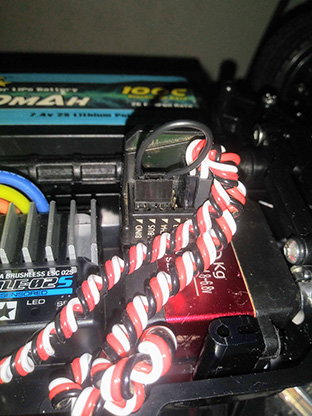

After plugging the binding plug in this way, power the receiver on.

Then turn on your Noble, and go to "RX SET", shown here in the bottom left.
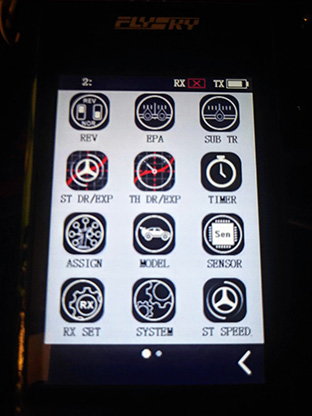

Then scroll all the way down and select "Update Receiver"
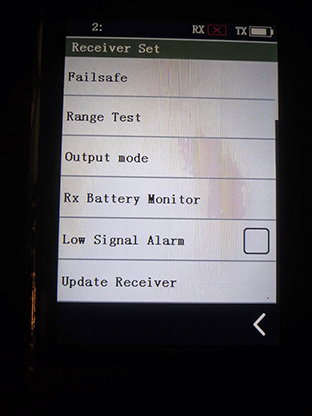

Then select what receiver you are using. And click "Update"
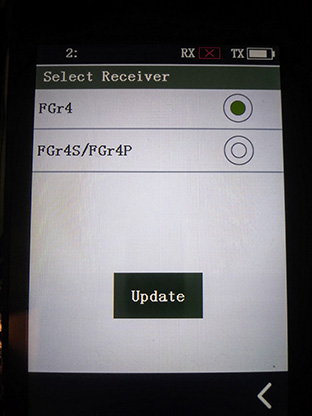

This should be it. You'll then see a progress bar and the radio will notify you when its done.

After that, turn off the receiver, rotate the binding plug to the "normal" way, in the bind port, and bind the radio.

I can make a more detailed explanation of that as well if needed. But its pretty much the same thing, binding plug in, power on receiver, "RX SET", "Bind With A Receiver", done.
i agree, definitely need to update the receiver. Unfortunately I have done the process that you shared with me a couple dozen times all the while trying to re-download firmware in case there was an issue somewhere with that. I cannot get either of the rx’s to update no matter what. A flySkye representative sent me a video process of exactly what you were demonstrating, and unfortunately like I said I had already done that many, many times. I submitted a video to them of me going through the process to make sure I was doing it right. At this point, I am almost certain that the issue lies with the transmitter. Whether it is software or a faulty transmitter - I am not sure. I appreciate the help and will update when I get an answer!

Edit- Edit - just tried to upload a video of the process, but our CRctech wouldn’t let me because of the format
Dob is offline